
Deposits and withdrawals: understand the balance before sending a transaction
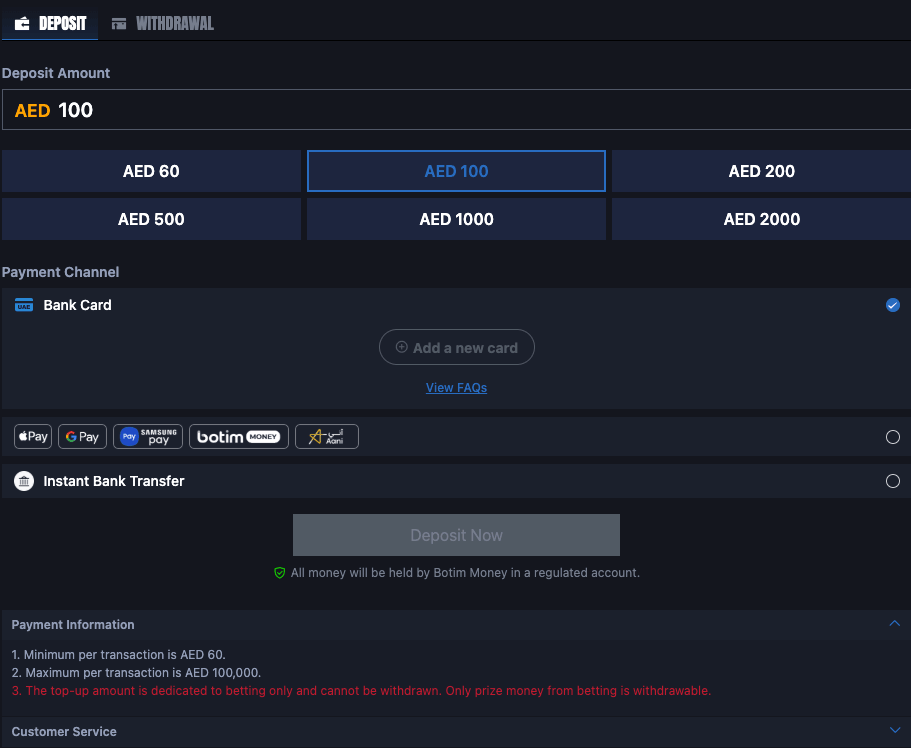
The wallet brings deposits, withdrawals and transaction history together. The account uses AED, with a stated minimum of AED 60 and a stated maximum of AED 100,000 per transaction. Before confirming anything, check the amount, selected payment method and any instructions shown for the transaction, then follow its status in history instead of repeating the request if the balance takes time to update.
Making an AED deposit and tracking it afterwards
Start in Deposit and choose the amount you intend to add. The interface includes quick values such as AED 60, 100, 200, 500, 1,000 and 2,000, while other values may be possible depending on the form. The minimum per transaction is AED 60, so check the amount before moving on to the payment channel.
Payment Channel can show options such as Bank Card and Instant Bank Transfer when those methods are available. Choose the method you actually intend to use and enter payment details only inside the transaction flow. If a new card needs to be added, review the information before submitting it and never send complete card details in a support chat.
After confirmation, open Transactions. If the request is still processing, do not create a second deposit with the same value simply because the balance has not changed yet. Transaction history is the right place to check the time, status and reference number if one is shown. Keep those details if support is needed later.
Withdrawals and the difference between account balance and withdrawable funds
The Withdrawal tab is used to create a withdrawal request. Before sending one, read the balance status and any requirements shown inside the account. Do not assume that every figure displayed in the wallet is immediately withdrawable; the nature of the balance can depend on whether it came from a top-up or from winnings.
The deposit information states that top-up funds are dedicated to betting and that withdrawal applies to prize money under the account conditions. For that reason, check the withdrawable amount shown by the wallet before creating a request. If it differs from the total balance, review the account details or ask support before trying the same action repeatedly.
When a withdrawal is submitted, note the time, amount and current status. If it remains pending, check Transactions or the help area before creating another request. Multiple requests for the same intended withdrawal make later follow-up harder and can create unnecessary confusion about the amount you meant to move.
Simple rules for safer wallet management
Do not treat the technical maximum as a spending target. Set an entertainment budget that does not affect rent, bills, food or debt payments. Once that budget is reached, stop depositing even if there is another match or game you want to follow.
Avoid financial actions on untrusted public Wi-Fi, and never share a password, verification code or full payment-card information with anyone. If a message asks for those details outside the normal account flow, ignore it and open the support area from your own account instead.
Review transaction history regularly. It helps identify unfamiliar activity, shows what has actually been deposited or requested for withdrawal, and makes it easier to compare wallet use with the budget you set. Good balance management comes from keeping track of activity rather than trying to remember it after several sessions.